How to repurpose video content for maximum ROI


Congratulations! You’ve produced a video you’re really happy with. Now all that’s left to do is upload it to your preferred streaming platform and forget about it, right? Well, not quite. Uploading it to one platform and moving on is a missed opportunity. A single video can generate weeks or even months of marketing content when used as part of a structured video marketing strategy.
There’s a much better way to maximise your investment, and it’s far less expensive than you might think…
Why video isn’t ‘one and done’
As video becomes more and more important in buying decisions (don’t just take our word for it) making the most of your content has become essential. The aim is to maximise the number of opportunities to engage with your audience and that means translating your content into the most eye-catching formats and showcasing it on the most relevant platforms.
Ensuring the consistency of your brand's look and feel across each touch point is also key to helping build trust and recognition. Plus, it means you can have content that can more easily be used at a later date.
This is where the strategy of producing one main film and cleverly repurposing it with mini edits comes into play. Where appropriate, you can also use it to create micro content (films or animations). Extracting key moments and insights from the hero video means marketers can tailor their content to suit different platforms and audience preferences.
What are the options
So how is it done? There are 3 main ‘Ms’ to bear in mind.
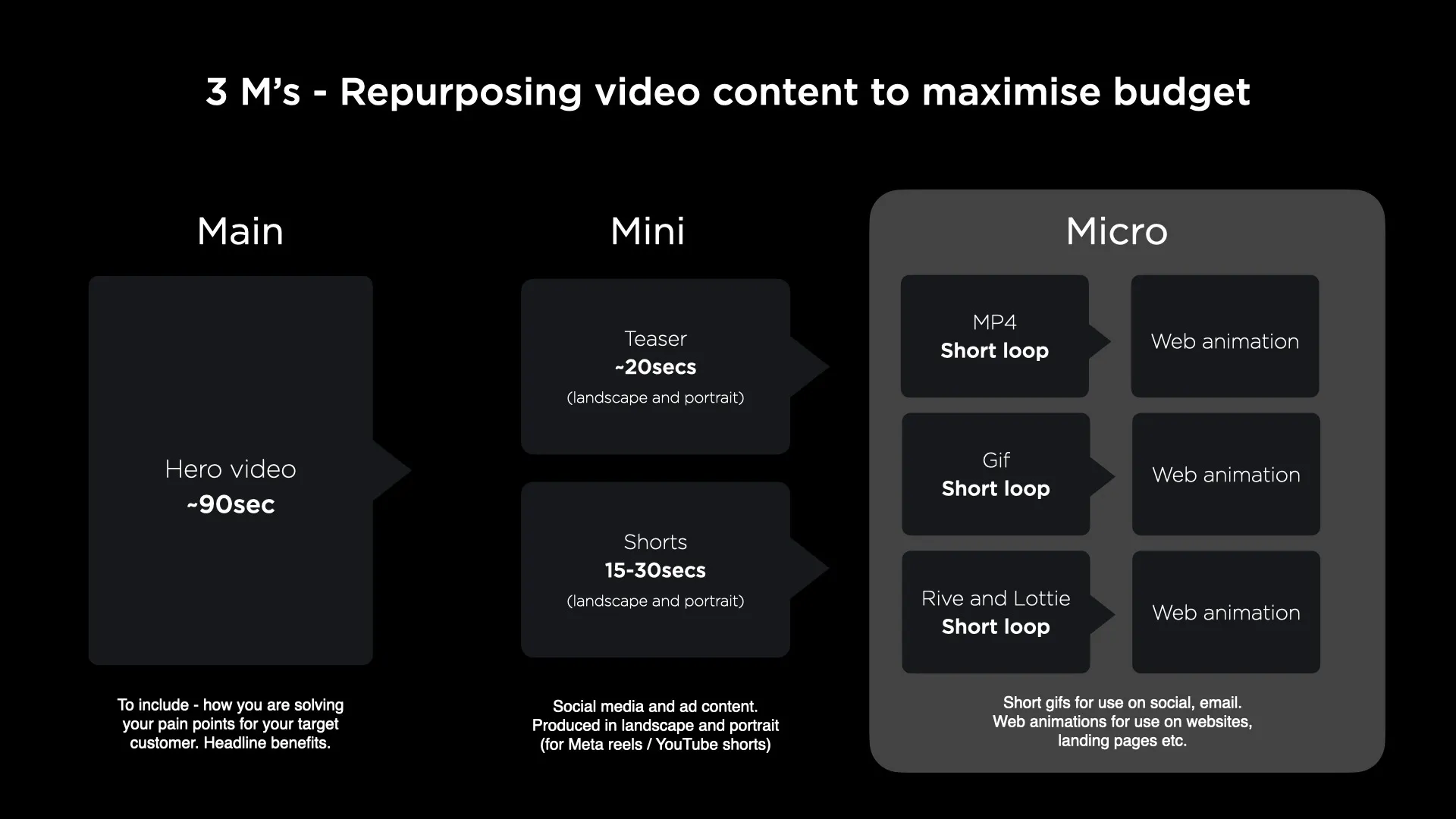
1. Main
The first M (Main) is pretty straight forward, so we won’t spend too much time here. Your Main is the complete film you’ve put all your effort and time into. A tight script, some fun effects and clever camera work and you’re good to go.
Where to use it
As a rule of thumb, you’ll want to put this on YouTube or your preferred streaming platform etc. YouTube is perhaps the best know and makes your videos very discoverable, but you might benefit from the additional insights a platform such as TwentyThree can provide. This allows you to continue refining how you position your content and helps you attract more views.
*Don’t forget that you might want to hype your main film using your shorter pieces of content first, so hang fire on posting it until you’ve released a few canny ‘teaser’ edits.
We've used an example from the TOUGHBOOK campaign we produced for technology pioneers, Panasonic, highlighting how we maximised the video assets – from the primary film to short clips and teaser content.
2. Mini (short form)
The second M (Mini) is where you start to create shorter, more focused edits of your Main film. A Mini edit’s purpose can either be to build a queue of people ready to watch your main film OR highlight unique parts of your offering.
For example, your Main film may be about your complete suite of products or services, but your Mini edits might break it down into your specialism in individual sectors. Equally, you might have produced a tutorial on how to use your product and found that people are most often searching for (and watching) one particular step of the process. Creating a Mini edit focused on that one step, packed with quality SEO, can increase your discoverability to new prospects.
The key here is not to create lots of new content, you should be aiming to recycle, reuse and reformat as much as possible into new edits.
Here’s a quick shorthand for how you might define those different types of edit.
Teasers
These give the audience a reason to watch your main video. What are you audience going to find out? Does it give a glimpse of a new product or service? Are you announcing a particular date or event? Perhaps your interview had a nugget of gold in, you can create a short edit that leads up to that point, encouraging viewers to watch your main film to find out more.
Think of this as a short snappy edit that sets everything else up. This will come out in advance of your main video, so the goal is to create a queue of people ready and waiting for when the main video launches.
Here's a little teaser video from the Panasonic Toughbook campaign.
Shorts
These combine as many hooks as possible to pull people towards your main film OR provide another CTA i.e. to a landing page or sign-up form.
By condensing the most compelling moments and messages from the core video into shorter formats, marketers can deliver targeted edits that resonate with different segments of their audience.
Where to use them
Now’s the time to think social media: using LinkedIn, Instagram, Facebook, Twitter, TikTok etc. With these platforms, your audience often wants smaller bite-size content.
Whether it’s a brief teaser, a highlight reel, or a quick tutorial, each edit serves to capture attention and drive engagement, ultimately leading viewers back to the full video for a deeper dive into the content.
Check out this short snippet from the Toughbook campaign- a quick example of how a single core video can evolve into engaging mini content that grabs the attention of the viewer.
3. Micro (Semiotics and statements)
This most often refers to content such as Gifs, presentations or web animations. Think of them as small single-issue messages, or very brief statements. Examples could be:
- one of your USPs (as above)
- a really short reel from the main film (we’re talking 10 seconds max)
- your icons, animated to highlight particular elements of your product or services
The key here is to keep it concise. If someone asked you to explain your micro edit, could you sum it up in one sentence? You’re giving potential customers clarity in seconds, and for the time-poor that’s a compelling reason to click.
Where to use them
The outputs for Micro tend to fall into gifs, MP4s, or Lotties and Rives, and the use cases are the broadest:
- Email banners
- Animated icons of features or USPs
- Looping videos for presentations
- Gifs/MP4s for websites backgrounds
- Infographics
- Customer journeys
Here's an example of how we make the most of one explainer video. This is our Atomic Design explainer video. We use the complete video to kick off pitches, giving the audience a quick overview of the methodology.
These are then cut down into single-issue looping animations, giving our Digital Design team a chance to talk in depth about a particular topic.
Conclusion
Video marketing remains a powerful tool for brands looking to engage audiences and drive meaningful interactions. By creating one full video and repurposing it into shorter edits, marketers can maximise the reach and impact of their content across various platforms –without drastically increasing the total cost.
A well thought out video marketing plan should guide your production of the video. It lets you know up-front exactly what the strategy is and the exact content you’ll need to produce. For example, when you animate that icon, is it also going to be needed for a Lottie? And, if so, what steps do you need to take to minimise additional work?
By combining compelling visuals with strategic messaging, and getting under the right noses, brands can create memorable experiences that resonate with their audience and drive tangible results.
If you're wondering how to squeeze even more value out of your video content, or just want to talk through your ideas, get in touch at marketing@proctorsgroup.com.